CRA My Account
Notice of Assessment (NOA)
Your CRA My Account allows you to view your Notice of Assessment (NOA) which confirms that the CRA has received and processed your tax return, and provides you with details about the amount of tax you owe or the refund you will receive.
The NOA provides valuable information about your tax situation, which can help us plan for your future tax years and make informed financial decisions.
Click here if you need Registration and Sign-In Instructions.
Most Recent Notice of Assessment (NOA)
Once you have filed your taxes, your most recent Notice of Assessment will be added to your CRA Mail shortly after.
Step 1 - Overview Screen
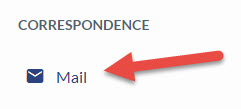
- From the CRA My Account Overview screen, click on the Mail link on the right Navigation under the Correspondence section
- This will take you to the Mail screen
Step 2 - Mail & Correspondence
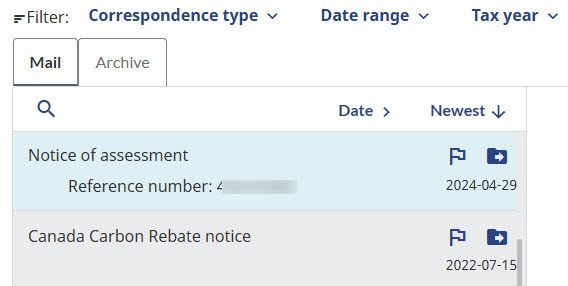
- You will now see a list of your recent correspondence items including any notices of assessment and reassessment
- Click on the Notice of assessment message
- Your Notice of assessment will open in the right frame
Step 3 - Save or Open
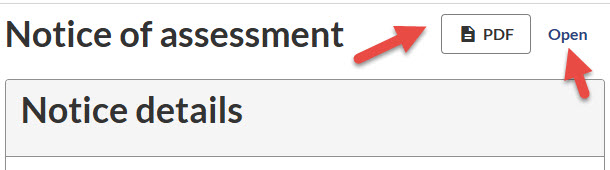
- To save your file, click on the PDF button in the top right
- To Open your file, click on the Open link in the top right and the full document will open
Historical Notice of Assessment (NOA)
Your CRA My Account also allows you to access your historical Notices of Assessment from previous years.
Step 1 - Overview Screen
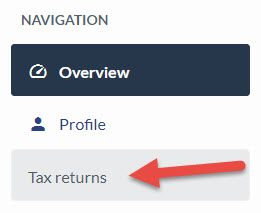
- From the CRA My Account Overview screen, click on the Tax returns link on the right Navigation
- This will take you to the Tax Returns screen
Step 2 - Tax Returns and Notices of Assessment
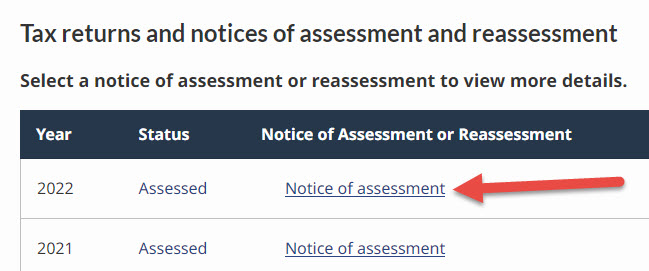
- You will now see a list of your tax returns and notices of assessment and reassessment
- Click on the Notice of assessment link to view a specific year
Step 3 - Print or Save

- Click on either the PDF button or the Print/Save link in the upper right
Do you need help or have questions about your Notice of Assessment?
Fill out the form below and we would be happy help.
Thank you for getting in touch!
One of our colleagues will get back to you shortly.
Have a great day!